Free tool / CLI
Architecture maps, generated from your code.
ArchByte reads a repository's source, infrastructure configuration and docs, runs AI agents over that context, and opens an interactive diagram of its components, connections and flows. Free to use. No account, no sign-in.
curl -fsSL https://diabhey.com/tools/archbyte/i | bash01 / Install
One binary. Two commands.
1 Install on macOS or Linux x64
curl -fsSL https://diabhey.com/tools/archbyte/i | bash2 Run it in your project
archbyte runOn first run ArchByte asks which model to use, checks that it answers, then scans the project and opens the diagram in your browser. archbyte doctor checks your setup any time. On Windows, download archbyte-windows-x64.exe and put it on your PATH. Already installed? Run archbyte update.
02 / Playground
See it before you install it.
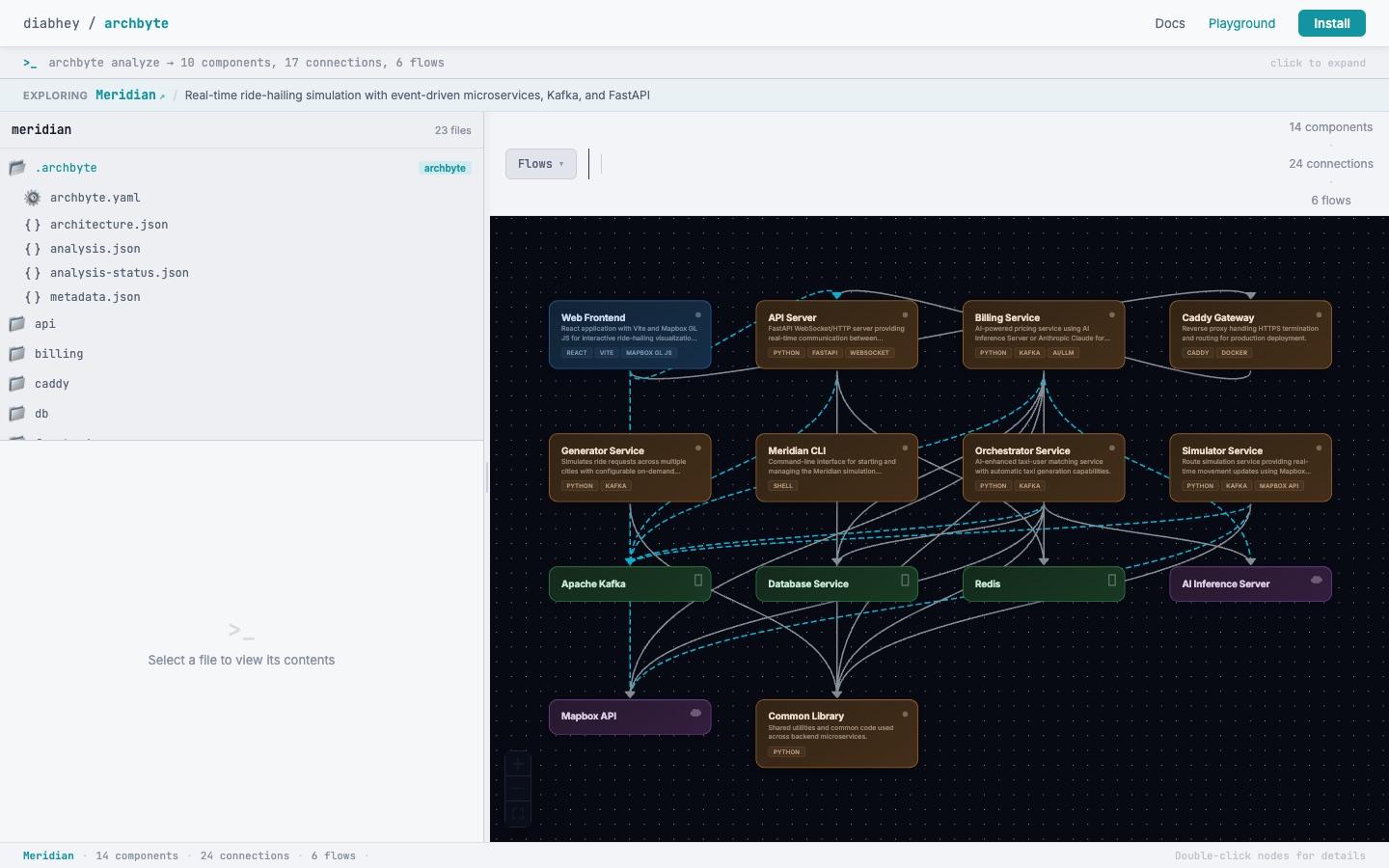
The playground runs the same diagram UI in your browser on a real project, Meridian: 14 components, 24 connections and 6 animated request flows. Click a component, trace a flow, open the source.
03 / What it does
Architecture from the code, not from memory.
Agents read the repository
A static scan collects structure, manifests, infrastructure, env var names and docs. Then agents find the components, describe them, trace request flows and map connections from evidence in the code, and a validator drops what it cannot support.
An interactive diagram
Layers from UI to outside services, step-by-step flow playback, component details and environment tabs. Drag things where you want them. ArchByte keeps positions between scans.
Re-scans only what changed
In a git repository, ArchByte re-reads only the components your changes touch, and the open diagram redraws when the scan finishes.
Review agents on demand
archbyte run --deep adds security, performance, compliance, dependency risk, API contract and drift reviews. The Audit panel checks your own rules.
Export anywhere
Mermaid, PlantUML, Graphviz DOT, Markdown, JSON, PNG, SVG and a standalone HTML file of the interactive diagram.
Built for coding agents
archbyte mcp lets Claude Code, Codex and other MCP clients scan a project and query its components, connections and flows.
04 / Your code, your model
Runs on your machine.
ArchByte uses Claude Code or Codex if you have either installed, so your existing subscription covers the model calls. Or bring your own Anthropic, OpenAI or Google API key; setup lists the models your key can use, including new ones. Model calls go straight from your machine to the provider you chose.
The agents only read. Claude Code gets read-only tools and Codex runs sandboxed (on macOS, confined to the project). ArchByte never reads secrets files such as .env, and archbyte run --debug shows exactly what it sends.
Want no model at all? archbyte run --static builds a rougher diagram from static analysis only.
ArchByte is free for personal and commercial use (licence). Release notes are on GitHub; found a bug or want something? Open an issue.
05 / In practice
Eleven services, five languages, one command.
One archbyte run on Google's microservices-demo, an online shop split into eleven services in Go, C#, Node.js, Python and Java, took 75 seconds. The diagram shows its gRPC call graph (18 connections), the Redis behind the cart and 6 request flows you can play step by step.